16 Mayıs 2023 Salı

Jsonb ?& Array Operator - All String Exists

Giriş
Açıklaması şöyle
?& - Checks if all of the strings in the text array exist as top-level keys or array elements. So generally if we have JSON property that contains an array then you can check if it contains all elements that you are searching by.
Aynı şeyi SQL ile şöyle yaparız. jsonb_all_array_strings_exist kullanılır
CREATE OR REPLACE FUNCTION jsonb_all_array_strings_exist(jsonb, text[]) RETURNS boolean AS $$ SELECT $1 ?& $2; $$ LANGUAGE SQL; SELECT
item0_.id as id1_0_, item0_.jsonb_content as jsonb_co2_0_ FROM item item0_ WHERE jsonb_all_array_strings_exist(jsonb_extract_path(item0_.jsonb_content,?), array[?,?])=true

7 Mayıs 2023 Pazar

PgPool

Giriş
Şu işleri yapıyor
1. Connection pooling
2. Replication and Load Balancing
3. Automated Failover
4. Query Caching
Mimarisel Özellikler
  • Primary purpose: Pooling, load balancing, HA, caching
  • Architecture: Multi-process, one process per connection
  • Memory per connection: ~3–5 MB (per child process)
  • Configuration complexity: Complex (multiple config files)
  • Codebase size: ~200k+ lines of C
  • Protocol support: PostgreSQL wire protocol + SQL parsing
Kaynak kullanımı şöyle
  • Query overhead per statement: 0.5–2 milliseconds (includes SQL parsing)
  • Max clients on 2 GB RAM: ~400 (limited by child processes)
  • Memory at 500 clients: ~1.5–2.5 GB
  • Connection storm (1000 simultaneous): Needs 1000 child processes or queues
  • CPU usage under load: Higher (process per connection + SQL parsing)
Kullanım Şekli
Açıklaması şöyle
A common production pattern is Patroni managing PostgreSQL replication and failover, PgBouncer providing connection pooling and HAProxy routing traffic to the correct server. This approach gives you best-in-class tooling for each concern but requires more components to configure and maintain. Pgpool-II combines these functions, trading some performance for operational simplicity.
Connection Routing
Açıklaması şöyle
Pgpool-II parses SQL queries to decide where to route them (reads to replicas, writes to primary). This parsing adds overhead but enables features that PgBouncer can't offer. PgBouncer passes queries through without inspecting them.
Açıklaması şöyle
It parses SQL queries and automatically routes SELECT statements to read replicas while sending writes to the primary. This read/write splitting is transparent to the application with no code changes needed. 
High Availability
Açıklaması şöyle
When the primary server goes down, Pgpool-II can promote a standby and reconfigure itself automatically using a failover script, so the application doesn't need to know about the topology change.

Beyond routing and failover, Pgpool-II continuously monitors backend servers and removes unhealthy ones from the pool through health checking. It can also run in a clustered mode with its watchdog feature, where multiple Pgpool-II instances monitor each other and one takes over with a virtual IP if another fails.
Database Monitoring
Açıklaması şöyle
Beyond routing and failover, Pgpool-II continuously monitors backend servers and removes unhealthy ones from the pool through health checking. It can also run in a clustered mode with its watchdog feature, where multiple Pgpool-II instances monitor each other and one takes over with a virtual IP if another fails.
PgPool ve PgBouncer 
Açıklaması şöyle. Yani PgBouncer  daha basit kalıyor
A lightweight connection pooler for PostgreSQL that can help manage connections and improve performance, but lacks advanced features like replication and failover support. PGBouncer is a good option if you need a simpler solution focused primarily on connection pooling.
Açıklama şöyle
Pgpool-II uses a different model. It maintains a pool of child processes, each handling one client. The child process holds a cached connection to the backend and reuses it across requests from the same client. Pgpool-II doesn't support transaction-level pooling in the same sense as PgBouncer. Its pooling is closer to session-level, where connections are cached per child process and reused when the same user/database combination connects again.
Bağlantı
Örnek
Şöyle yaparız
postgres://admin:xxx@pgpool.default:5432/example_db
Ini Dosyası
Açıklaması şöyle
Pgpool-II configuration involves multiple files: pgpool.conf for general settings, pool_hba.conf for authentication, pcp.conf for management commands and potentially failover scripts. The main config file has hundreds of parameters covering pooling, load balancing, replication, health checking and watchdog clustering.
Örnek
Şöyle yaparız
# Pgpool-II load balancing configuration
load_balance_mode = on
backend_hostname0 = 'primary.db.local'
backend_port0 = 5432
backend_weight0 = 1
backend_flag0 = 'ALWAYS_PRIMARY'
backend_hostname1 = 'replica1.db.local'
backend_port1 = 5432
backend_weight1 = 2
backend_hostname2 = 'replica2.db.local'
backend_port2 = 5432
backend_weight2 = 2


3 Mayıs 2023 Çarşamba

Process Architecture

Giriş
Şeklen şöyle

İki tane temel process var
1. Postmaster Process
2. Backend Process
3. Auxiliary Processes
Bunlar
- Background Writer (bw)
- Checkpointer (cp)
- Startup Process (st)
- Logger (lg)
- Autovacuum Launcher (avl)
- WAL writer (ww)
- WAL receiver (wr)
Other Processes
- Autovaccume workers
- WAL senders

Backend Process
Açıklaması şöyle
The postmaster process creates a new “backend” process for every connection it accepts. The connection is then handed over to the new backend process to perform the reading of the TCP stream, request parsing, SQL query parsing (yes those are different), planning, execution and returning the results. The process uses its local virtual memory for sorting and parsing logic, this memory is controlled by the work_mem parameter.

Connection Pooling
Açıklaması şöyle
.. the number of backend processes is capped by the number of connections, the max_connections parameter defaults to 100

Açıklaması şöyle
For each client on the server, its own servicing process is spawned. A large number of connections can cause problems:
  • Each process requires memory to store the cache of the system catalog, prepared queries, intermediate query results, and other data. The more connections that are open, the more memory needs to be available.
  • If connections are performed frequently and the sessions are short (i.e., the client executes one small query and disconnects), a prohibitive amount of resources will be spent on establishing connections, spawning new processes, and unnecessary filling of local caches.
  • The more processes that are running, the more time is required to scan their list, and this operation is performed very frequently. As a result, performance can decrease as the number of clients increases.
In such cases, connection pooling is used to limit the number of servicing processes. PostgreSQL does not have a built-in connection pool, so third-party solutions have to be used: pool managers built into the application server or external programs (such as PgBouncer or Odyssey).

23 Nisan 2023 Pazar

Page Yapısı

Giriş
Açıklaması şöyle
In a row-store database engine, rows are stored in units called pages. Each page has a fixed header and contains multiple rows, with each row having a record header followed by its respective columns.
Şeklen şöyle

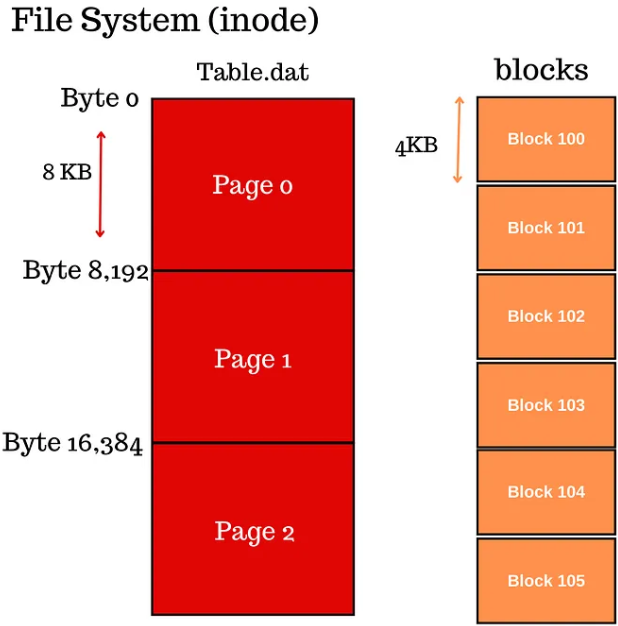
Dosya Sistemi
Page yapısı ile dosya sisteminin block yapısı birbiri ile uyumlu olmayabilir. Şeklen şöyle


Buffer pool
Açıklaması şöyle
Buffer pool is a shared memory space between all the database processes where the pages are kept, the pages can also receives writes there too.


Index Only Scans - SELECT ve WHERE İçinde Sadece Index'li Sütun Var

Giriş
Açıklaması şöyle
Index Only scans are very similar to index scans except that they scan only the indexes and do not touch the table data. This is possible only if the query contains the indexed column in both the SELECT and WHERE clauses
SELECT *
Açıklaması şöyle. Yani SELECT * varsa Index Only Scan olamaz
Using SELECT * means that the database optimizer cannot choose index-only scans. For example, let’s say you need the IDs of students who scored above 90, and you have an index on the grades column that includes the student ID as a non-key, this index is perfect for this query.

However, since you asked for all fields, the database needs to access the heap data page to get the remaining fields increasing random reads resulting in far more I/Os. In contrast, the database could have only scanned the grades index and returned the IDs if you hadn’t used SELECT *.
Etkisiz Kılmak
Açıklaması şöyle
# To disable the index on session level run below query.
set enable_indexscan TO OFF;
Kullanım
Örnek
Şöyle yaparız. Burada id alanı için indeks yaratılıyor
CREATE INDEX id_idx ON fake_data USING BTREE(id);
Sorgu içinde sadece id alanını çekeriz şöyle yaparız
EXPLAIN ANALYZE SELECT id FROM fake_data WHERE 
 fake_data.id = 1000;
Örnek
Şöyle yaparız. Burada select içinde indeks sütunu ismi geçmiyor ama COUNT(*) aynı anlama geliyor. WHERE koşulunda da sadece indekslenmiş alan var.
> CREATE TABLE grades(id SERIAL NOT NULL, g INT NOT NULL);
> CREATE INDEX grades_index ON grades(g);

> EXPLAIN ANALYZE SELECT COUNT(*) FROM grades  WHERE g=30;
   QUERY PLAN                                                                
-----------------------------------------------------------------------------------------------------------------------------------------
 Aggregate  (cost=231.09..231.09 rows=1 width=8) (actual time=4.709..4.711 rows=1 loops=1)
   ->  Index Only Scan using grades_index on grades  (cost=0.42..206.75 rows=9733 width=0) (actual time=0.052..3.322 rows=10038 loops=1)
         Index Cond: (g = 30)
         Heap Fetches: 0
 Planning Time: 0.207 ms
 Execution Time: 4.774 ms

6 Nisan 2023 Perşembe

JDBC PGXADataSource Sınıfı

Giriş
Şu satırı dahil ederiz
import org.postgresql.xa.PGXADataSource;
PGSimpleDataSource yazısına bakılabilir

Örnek
Şöyle yaparız
import org.postgresql.ds.common.BaseDataSource;

PostgreSQLContainer container = ...;

BaseDataSource dataSource = new PGXADataSource();
dataSource.setUrl(container.getJdbcUrl());
dataSource.setUser(container.getUsername());
dataSource.setPassword(container.getPassword());
dataSource.setDatabaseName(container.getDatabaseName());

5 Nisan 2023 Çarşamba

Testcontainers PostgreSQLContainer Sınıfı

Giriş
Şu satırı dahil ederiz
import org.testcontainers.containers.PostgreSQLContainer;
Üç tane bağımlılık gerekiyor. Açıklaması şöyle
1. org.testcontainers:testcontainers
includes core packages.
2. org.testcontainers:postgresql
includes PostgreSQL-specific packages. This dependency depends on database which your application is using. You will find the list of supported databases here.
3. org.testcontainers:junit-jupiter
integrates JUnit with Testcontainers.
Maven
Şu satırı dahil ederiz
<properties>
  <testcontainers.version>1.16.0</testcontainers.version>
</properties>

<dependency>
  <groupId>org.testcontainers</groupId>
  <artifactId>junit-jupiter</artifactId>
  <scope>test</scope>
</dependency>

<dependency>
  <groupId>org.testcontainers</groupId>
  <artifactId>postgresql</artifactId>
  <scope>test</scope>
</dependency>

<dependencyManagement>
  <dependencies>
    <dependency>
      <groupId>org.testcontainers</groupId>
      <artifactId>testcontainers-bom</artifactId>
      <version>${testcontainers.version}</version>
      <type>pom</type>
      <scope>import</scope>
    </dependency>
  </dependencies>
</dependencyManagement>
Gradle
Şöyle yaparız
dependencies {
 ...
 testImplementation 'org.testcontainers:testcontainers'
 testImplementation 'org.testcontainers:postgresql' 
 testImplementation 'org.testcontainers:junit-jupiter'
 ...
}

dependencyManagement {
 imports {
  mavenBom "org.testcontainers:testcontainers-bom:1.17.6"
 }
}
1. DriverManager.getConnection İle Kullanımı
PostgreSQLContainer nesnesi yaratıldıktan sonra JDBC ile iş yapacaksak DriverManager nesnesini kullanarak JDBC Connection elde etmek lazım. 

Örnek - URL + UserName + Password
DriverManager.getConnection() çağrısına kullanıcı adı ve şifre geçeceksek şöyle yaparız
DockerImageName POSTGRES_IMAGE =
  DockerImageName.parse("debezium/example-postgres:1.7")
  .asCompatibleSubstituteFor("postgres");

PostgreSQLContainer container = new PostgreSQLContainer<>(POSTGRES_IMAGE)
  .withDatabaseName("postgres")
  .withUsername("postgres")
  .withPassword("postgres")
  .withConnectTimeoutSeconds(300)
  .withStartupTimeoutSeconds(300)
  .withStartupAttempts(5)
  .withCreateContainerCmdModifier(createContainerCmd -> {...})

container.start();

 try (Connection connection = DriverManager.getConnection(container.getJdbcUrl(), 
                                                          container.getUsername(),
                                                          container.getPassword())) {
  connection.setSchema("inventory");
  try (Statement statement = connection.createStatement()) {
    ...
  }
}
Örnek - URL İçinde UserName ve Password
Eğer DriverManager.getConnection() ile sadece URL kullanacaksak şöyle yapmak gerekiyor
String jdbcUrl = container.getJdbcUrl() + "&user=" + container.getUsername() +
                                  "&password=" + container.getPassword();
// Output
jdbc:postgresql://localhost:52135/test?loggerLevel=OFF&user=test&password=test

 2. PostgreSQLContainer Metodlar
Çok fazla metod var. Bazı örnekler aşağıda

getDriverClassName metodu
Örnek - Eski Spring Kodu
Şöyle yaparız.  Yeni Spring ile artık @DynamicPropertySource anotasyonuna gerek yok
@Testcontainers
@ContextConfiguration(classes = {PersistenceConfig.class})
@DataJpaTest
@AutoConfigureTestDatabase(replace = AutoConfigureTestDatabase.Replace.NONE)
public class StudentRepositoryJpaIT extends StudentRepositoryTest {

  @Container
  public static PostgreSQLContainer container = new PostgreSQLContainer("postgres:latest")
    .withDatabaseName("students_db")
    .withUsername("sa")
    .withPassword("sa");


  @DynamicPropertySource
  public static void overrideProperties(DynamicPropertyRegistry registry){
    registry.add("spring.datasource.url", container::getJdbcUrl);
    registry.add("spring.datasource.username", container::getUsername);
    registry.add("spring.datasource.password", container::getPassword);
    registry.add("spring.datasource.driver-class-name", container::getDriverClassName);
  }
  ...
}
getFirstMappedPort
Örnek
Şöyle yaparız
Integer hostPort = container.getFirstMappedPort();
getHost metodu
Örnek
Şöyle yaparız
String host = container.getHost()
getJdbcUrl metodu
Şöyle yaparız
import org.junit.jupiter.api.Test;
import org.testcontainers.containers.PostgreSQLContainer;

public class PostgresIntegrationTest {
  @Container
  private static final PostgreSQLContainer<?> postgresContainer =
    new PostgreSQLContainer<>("postgres:latest");

  @Test
  void testDatabaseConnection() {
    // Get database connection properties from the container instance
    String jdbcUrl = postgresContainer.getJdbcUrl();
    String username = postgresContainer.getUsername();
    String password = postgresContainer.getPassword();

    // Perform database tests using the connection properties
    // ...
  }
}
getMappedPort metodu
Açıklaması şöyle
You cannot choose which actual port is used on the host machine. TestContainers chooses one automatically and makes it accessible through getMappedPort(containerPort) method on the container instance. You can also use getFirstMappedPort() if you only have one.
Örnek
Şöyle yaparız
Integer hostPort = container.getMappedPort(8080);
Örnek
Şöyle yaparız. PostgreSQLContainer.POSTGRESQL_PORT değişkenin değeri 5432
Integer hostPort = container.getMappedPort(PostgreSQLContainer.POSTGRESQL_PORT);
withCommand metodu
Örnek
Şöyle yaparız
public static PostgreSQLContainer container = new PostgreSQLContainer<>("postgres:12.1")
  .withCommand("postgres -c max_prepared_transactions=10")
  .withCommand("postgres -c max_connections=500");
Aynı şeyi şöyle yaparız
public static PostgreSQLContainer container = new PostgreSQLContainer<>("postgres:12.1")
  .withCommand("postgres -c max_prepared_transactions=10 -c max_connections=500");
withTmpFs metodu
Örnek
Şöyle yaparız. Burada PGDATA ortam değişkeni de /var/lib/postgresql/data olarak değiştiriliyor ama bence gerek yok. Çünkü varsayılan değer zaten böyle
var container = PostgreSQLContainer(postgresDockerImage)
  .withDatabaseName("dataBaseName")
  .withUsername("username")
  .withPassword("password")
  .withEnv(mapOf("PGDATA" to "/var/lib/postgresql/data"))
  .withTmpFs(mapOf("/var/lib/postgresql/data" to "rw"))

withUsername metodu
Şöyle yaparız
@Container
private static final PostgreSQLContainer<?> postgresContainer =
  new PostgreSQLContainer<>(DockerImageName.parse("postgres:latest"))
    .withDatabaseName("mydb")
    .withUsername("user")
    .withPassword("password");