28 Ekim 2021 Perşembe

EXPLAIN ANALYZE - Cümleyi Çalıştırır

Giriş
SQL cümlesi için kullanılan "Query Plan" bilgisini gösterir. Açıklaması şöyle
There are several node types in PostgreSQL query plans,
Scans.
Joins.
Sort.
Aggregates etc.,
Explain vs Explain Analyze
Explain için söz dizimi şöyle
EXPLAIN (ANALYZE, VERBOSE) SELECT * FROM your_table WHERE condition;
Açıklaması şöyle. Yani EXPLAIN ANALYZE cümleyi çalıştırır
You can use the EXPLAIN and EXPLAIN ANALYZE commands to view the query plan and see if it makes sense (i.e. by running EXPLAIN ANALYZE <query_statement>).

Note that EXPLAIN is a read-only DB operation but EXPLAIN ANALYZE isn’t! Be very careful not to use EXPLAIN ANALYZE on an UPDATE or DELETE statement, as it will actually execute the query and modify the database.

Scan Çeşitleri
Bazı çeşitler şöyle
1. Sequential Scans
2. Index Scans
3. Index Only Scans
4. Bitmap Heap Scan & Bitmap Index Scan
5. Parallel Scans

1. Sequential Scans
Sequential Scans yazısına taşıdım

2. Index Scans
Eğer tabloda bir sütun için indeks varsa kullanılır. Index genellikle where koşulundaki sütuna konulur

Where koşulu Sırası
Açıklaması şöyle. Yani (tenantId, status) şeklinde index olsa bile ikinci sırada belirtilen where koşulu bunu kullanmayabiliyor. (status, tenantId) şeklinde yeni bir index yaratılabilir ama bence en kolayı sorguyu değiştirmek
Two of the queries had the following WHERE clause:
WHERE "tenantId" = 'some_tenant_id' AND "status" != 'dismissed'.
The other two had the conditions in the opposite order:
WHERE "status" != 'dismissed' AND "tenantId" = 'some_tenant_id'.

Postgres may choose different execution plans depending on the order of the conditions in the WHERE clause, so it treated these as distinct queries. As mentioned earlier, I added a multi-column index on the (tenantId, status) columns in the Notes table, but this only improved the performance of the first two queries. The other two queries, which had the opposite order of conditions in the WHERE clause, were unable to benefit from this index.

Örnek
Şöyle yaparız. Burada id alanı için indeks yaratılıyor
CREATE INDEX id_idx ON fake_data USING BTREE(id);
Sorgu için şöyle yaparız
EXPLAIN ANALYZE SELECT * FROM fake_data WHERE 
 fake_data.id = 1000;
Örnek
Şöyle yaparız
SELECT * FROM songs WHERE (artists_id = 1 AND album_id = 1);
Çıktısı şöyle
Index Scan using songs_artists_id_album_id_index on songs  
(cost=0.28..6.05 rows=1 width=159) (actual time=5.555..5.562 rows=10 loops=1)
   Index Cond: ((artists_id = 1) AND (album_id = 1))
 Planning Time: 311.482 ms
 Execution Time: 9.266 ms
(4 rows)
Açıklaması şöylee
(cost=0.28..6.05 rows=1 width=159) refers to the planner's estimations while (actual time=5.555..5.562 rows=10 loops=1) refers to the actual results of the executing the plan. The planner estimated 1 row would be returned, but there were actually 10.

The planner calculated its row estimate by first taking the total number of Songs (1000), then considering the artists_id filter. 10% of Songs have artists_id = 1 so that leaves 100 Songs. Next it considers the album_id filter. 1% of Songs have album_id = 1, so it's left with 1 Song.

The key piece of information Postgres is missing is that artist_id and album_id are strongly correlated. In fact, knowing the album_iduniquely determines the artist_id. Had Postgres known about this, it could have used only the album_id = 1 filter in its estimation and come up with the correct result of 10 Songs.

3. Index Only Scans
Index Only Scans yazısına taşıdım

4. Bitmap Index Scan ve Bitmap Heap Scan


12 Ekim 2021 Salı

Generalized Inverted Index - GIN Index - Full Text Search İçindir

Giriş
GIN bir Full Text Search için kullanılır. Açıklaması şöyle
The GIN (Generalized Inverted Index) index is a specialized index type in PostgreSQL designed for efficient full-text search. When a GIN index is created on a `ts_vector` column, it builds an index structure that maps each lexeme to the documents that contain it. This index is optimized for quick lookups, making it ideal for full-text search operations.
Açıklaması şöyle
The GIN index enables PostgreSQL to perform queries involving the `@@` operator, which checks if a `ts_vector` column matches a `tsquery` (a query expressed in the same tokenized format). The GIN index speeds up the search by efficiently locating the relevant documents based on the lexemes present in the search query, without the need for a sequential scan of all documents.
TSVECTOR Sütun Tipine Göre Index

TEXT  Sütun Tipine Göre Index
Örnek
Şöyle yaparız
CREATE INDEX trgm_idx on storm_events USING gin(event_type gin_trgm_ops);
JSONB Sütun Tipine Göre Index
JSONB Sütun Tipine Göre Index yazısına taşıdım

29 Eylül 2021 Çarşamba

LEAD ve LAG

Giriş
Basic Window Functions şöyle
Aggregate Functions : SUM, COUNT, MIN, MAX, AVG
Ranking Functions : RANK, DENSE_RANK, ROW_NUMBER, NTILE
Value Functions : LAG, LEAD, FIRST_VALUE, LAST_VALUE
Açıklaması şöyle. Bir önceki veya sonraki satırın değerine erişebilme imkanı sağlar. Eğer böyle bir satır yoksa NULL döner.
The LEAD() function returns the next value of the current value.
The LAG() function returns the previous value of the current value.
Açıklaması şöyle
NOTE: LEAD() / LAG() function never works without ORDER BY clause.
Örnek
Şöyle yaparız
SELECT name, city, LEAD(amount) OVER(PARTITION BY city ORDER BY amount ASC) AS next_amount_value FROM Orders

SELECT name, city, LAG(amount) OVER(PARTITION BY city ORDER BY amount ASC) AS next_amount_value FROM Orders

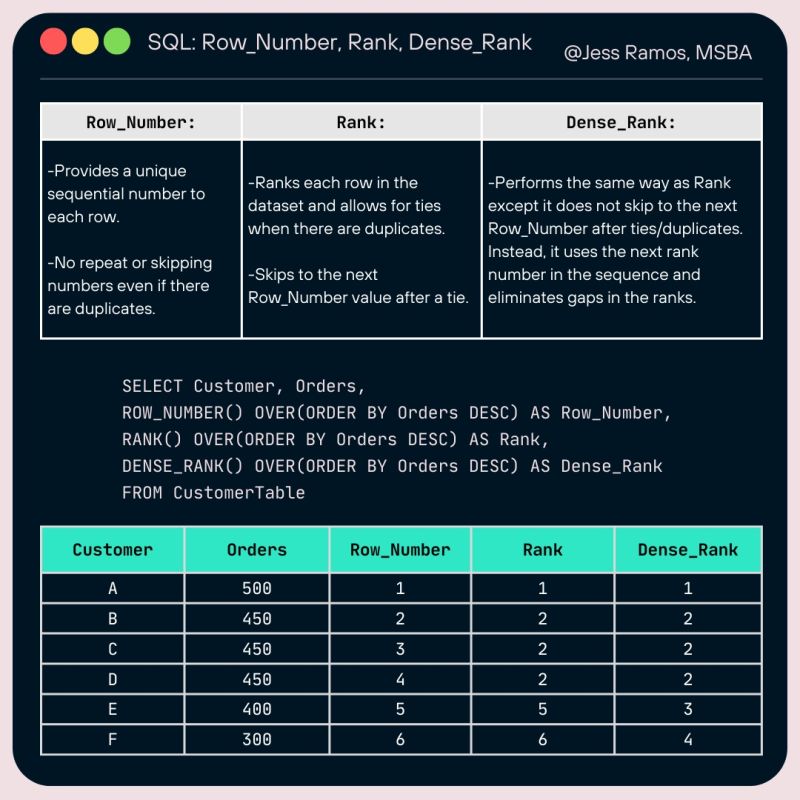
DENSE_RANK + OVER - Gruplar ve Her Gruba Sırayla Numara Verir

Giriş
DENSE_RANK() : Satırlar gruplanır. Bir gruptaki satırlara aynı sayıyı verir. Grup değişince bir sonraki sayıdan devam eder. Verilen sayılar arasında boşluk olmaz

RANK(): Satırlar gruplanır. Bir gruptaki satırlara aynı sayıyı verir. Grup değişince bir sonraki sayıdan devam etmez .

ORDER_BY(): Satırları gruplamaz. Sadece sayı verir.

Şeklen şöyle

Bir başka şekil şöyle


İki kullanım var
1. DENSE_RANK + OVER (PARTITION BY ...) : 
2. DENSE_RANK + OVER (ORDER BY ...)


1. DENSE_RANK + OVER (PARTITION BY ...)
PARTITION BY + ORDER BY grubun ilk n sayıdaki elemanını çekmek için kullanılır.
Örnek
Şöyle yaparız
SELECT * FROM ( SELECT ad,tarih ,DENSE_RANK() OVER(PARTITION BY ad ORDER BY tarih DESC) sira FROM kullanici) WHERE sira=1
Örnek
Elimizde şöyle bir tablo olsun
qid  segment task    before  after   diff
------------------------------------------
1       0    aaa       5     5       0
1       1    aaa       15    15      0
1       1    aaa       10    5      10
1       0    aaa       10    5       5
3       0    bbb       10    4       6
Bu tablodaki aynı task grubu için en büyük qid değerini ve ona ait segment değerini çekmek isteyelim. Yani çıktı şöyle olsun
task    before  after   diff
-----------------------------
aaa       25    20      10
bbb       10    4       6
Şöyle yaparız. task alanına göre gruplayıp, qid ve segment büyükten küçüğe sıralanır. Bu satıra rnk olarak 1 verilir. Daha sonra rnk = 1 olan satırlar seçilir.
with cte as
(
    select
        *,
        dense_rank() over (partition by task order by qid desc, segment desc) as rnk
    from myTable
)

select
    task,
    sum(before) as before,
    sum(after)  as after,
    sum(diff) as  diff
from cte
where rnk = 1
group by
    task
2. DENSE_RANK + OVER (ORDER BY ...)
DENSE_RANK + OVER (ORDER BY ...) yazısına taşıdım

9 Eylül 2021 Perşembe

PostGIS ST_Contains

Örnek
Şöyle yaparız. burn_area.geom alanı içine düşen şehirleri buluruz.
SELECT city.name FROM burn_area, city
  WHERE ST_Contains(burn_area.geom, city.geom)

CREATE VIEW

Örnek - WHERE Koşulu
Şöyle yaparız
-- Create a view that pre-aggregates the spending data for each user over the last year
CREATE VIEW user_spending_last_year AS
  SELECT user_id, SUM(amount) AS total_spending
  FROM transactions
  WHERE transaction_date >= '2022-01-01'
  GROUP BY user_id;
Örnek - İki Tabloyu Birleştirmek
Elimizde iki tablo olsun
CREATE TABLE staff(
   id INT,
   age INT,
   address TEXT
);
 
 
CREATE TABLE salary(
   sal_id INT,
   salary INT,
   division TEXT
);
Şöyle yaparız
CREATE VIEW STAFF_SALARY_COMBINED AS (
	SELECT * 
	FROM staff,salary 
	WHERE id=sal_id
);

Non-Atomic Columns

Giriş
Sütunun dizi şeklinde olmasına izin verir

Örnek
Şöyle yaparız
CREATE TABLE customers (
name TEXT, address TEXT, payment_schedule INTEGER[]
);
Biraz veri ekleyelim
INSERT INTO customer VALUES( 'jack','Athens, Colarado','{1,2,3,4}')
 
INSERT INTO customer VALUES( 'jackson','Tennessey, greece','{1,7,3,4}')
Dizi değerlerine erişmek için şöyle yaparız
SELECT * FROM customer WHERE
  customer.payment_schedule[1] <> customer.payment_schedule[2];